DIGITAL NAVIGATORS
PARTNER TOOLKIT
PARTNER RESOURCES
Introduction to the Digital Navigators Partner Toolkit
Bridging the Digital Divide
on the Central Coast
Bridging the Digital Divide on the Central Coast
This toolkit provides everything you need to help your organization share MBEP’s Digital Navigators program with the residents you serve.
Community organizations like yours play an essential role in connecting residents to resources that improve quality of life. You are uniquely positioned to help bridge the digital divide through trusted relationships with families, seniors, job seekers, and underserved communities.
About this Toolkit
This toolkit provides everything you need to promote Digital Navigators: MBEP, including:
- Program overview
- Referral guidance
- Frequently asked questions
- Ready-to-use outreach materials
- Sample newsletter and social media content
Our Goal
Together, we hope to:
- Increase digital skills
- Expand internet adoption
- Connect residents to essential online services
- Reduce barriers to economic opportunity
About Digital Navigators
Program Overview
Digital Navigators are trained staff who provide one-on-one support to help community members build digital skills, access technology, and connect to affordable internet service.
The Digital Navigators: MBEP program is a free initiative providing personalized, bilingual support to help residents build digital skills and secure affordable internet access.
- Free Digital Literacy Classes: Bilingual (English/Spanish) instruction offered both in-person and virtually.
- Affordable Internet Assistance: Provide resources on checking eligibility and enrolling in an affordable internet plan or discount program
- Individualized Technical Support: Ongoing assistance for participants during and after their classes.
Our mission is to ensure every resident has the skills, tools, and support needed to participate in today’s digital world.
Program Goals
During this project, MBEP will:
- Train at least 275 residents per county, over a 24-month period
- Increase digital confidence
- Help at least 30 households connect to affordable home internet
- Connect residents to online resources
Class Details & Curriculum
Our program utilizes the statewide Parent University Consortium curriculum, which is culturally and linguistically tailored for our community.
- Course Structure: 12 total hours of instruction, typically delivered as six 2-hour sessions twice a week for three weeks.
- Skill Levels: Includes Beginner, Intermediate, and Advanced tracks.
- Examples of Topics: Essential communications (email), navigating school portals, workforce skills (resumes, job searching), and digital health and wellness.
- In-Person Launch: In-person classes are scheduled to launch in mid-July. Virtual classes are ongoing.
Why Digital Skills Matter
Technology affects nearly every aspect of everyday life
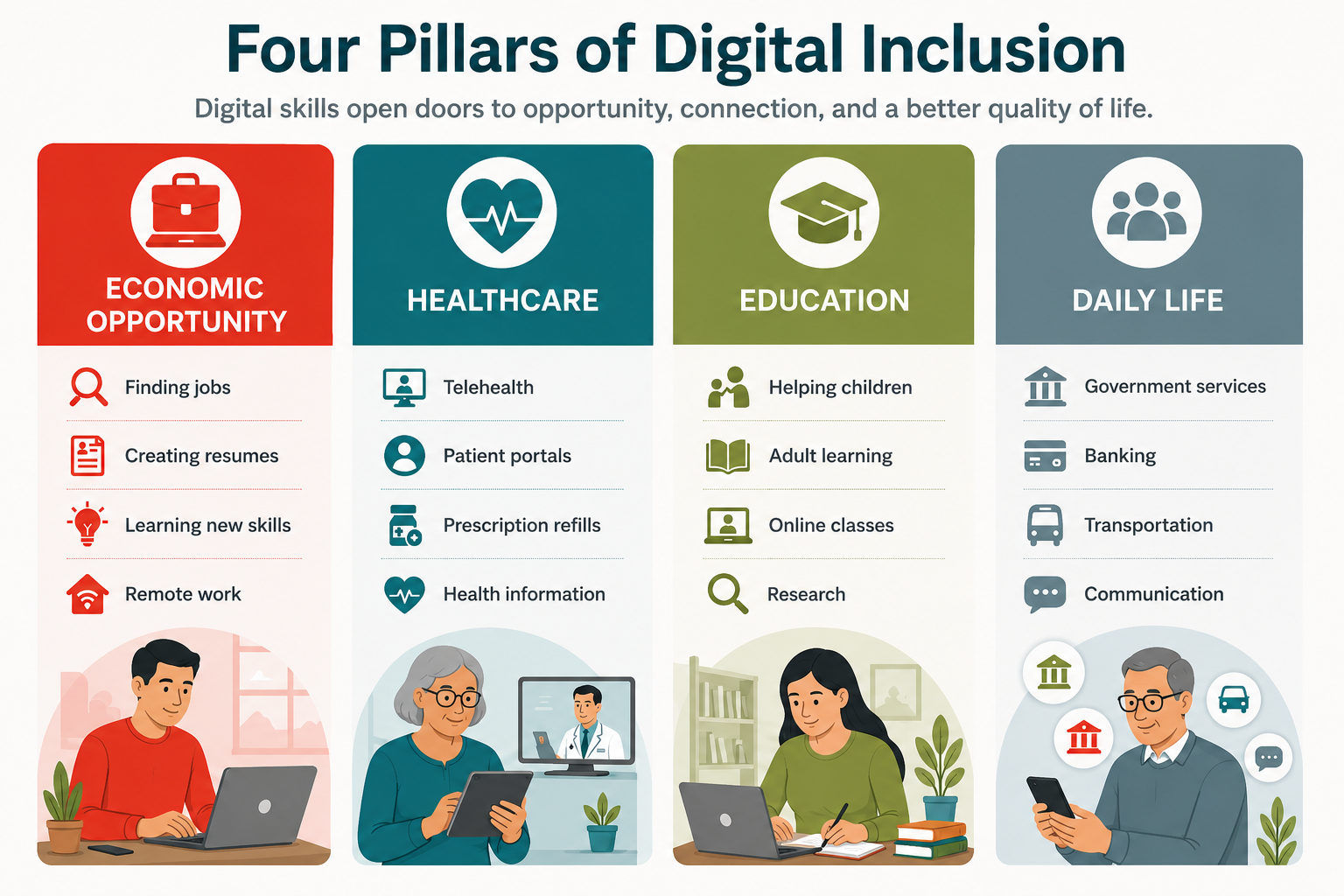
Today, digital skills are essential for nearly every aspect of everyday life. Residents without digital skills often face barriers to employment, healthcare, education, public benefits, and social connection. Digital literacy is a foundational skill for participating in today’s economy and society.
Why This Matters for Your Clients
- People you already serve may struggle with:
- Creating an email account
- Completing online job applications
- Using Zoom for online interviews and appointments
- Navigating MyChart and government service web portals
- Completing training and professional development online
- Using technology to stay connected with loved ones
- Comparing affordable internet plans
Who Should Be Referred?
Who is This Program For?
Digital Navigators: MBEP is open to all residents age 18 and older. Whether someone is just learning how to use a computer or wants to strengthen more advanced digital skills, our classes are designed to meet participants where they are.
We encourage partners to refer anyone who wants to become more confident using technology for work, school, healthcare, or everyday life. MBEP will work directly with each participant to determine the most appropriate class level, answer questions, and provide enrollment information.
Residents Who May Benefit Most
Consider referring individuals who:
Older Adults (Seniors)
- Want to stay connected with family and friends
- Need help using computers or email
- Want to access telehealth or online medical records
- Need assistance avoiding online scams and fraud
Parents & Caregivers
- Support children using school portals or online homework
- Communicate with teachers through email or apps
- Access educational resources at home
Job Seekers & Workers
- Need help creating resumes
- Complete online job applications
- Attend virtual interviews
- Want to strengthen workplace technology skills
- Are interested in learning AI or other emerging technologies
English Learners & Spanish Speakers
- Prefer bilingual instruction
- Need support navigating online services in English
- Want culturally relevant instruction
Rural Residents
- Have limited access to technology training
- Need help using online services that reduce travel
- Want to maximize the value of their home internet connection
Individuals with Limited Digital Skills
- Have never owned or regularly use a computer
- Feel intimidated by technology
- Need help using email, the internet, or online forms
- Want to build confidence in a supportive environment
Covered Populations
The California Advanced Services Fund (CASF) Adoption Account prioritizes serving populations that have historically faced barriers to digital access.
- These include:
- Low-income households
- Older adults (60+)
- Individuals belonging to racial or ethnic minority groups
- English learners
- Rural residents
- Veterans
- Individuals with disabilities
- Other historically underserved populations
While our program is open to everyone, these communities often experience the greatest challenges in accessing affordable internet, developing digital skills, and using technology confidently.
By connecting these residents to training and support, we can help reduce barriers to employment, education, healthcare, and civic participation while ensuring that all residents have the opportunity to participate in today’s increasingly digital world.
How the Program Works
Step 1 – Register for Classes
Residents complete a short online Interest Form for our upcoming in-person classes, or register directly for virtual classes.
They can:
- Scan a QR code
- Visit our website
- Call our team directly
Step 2 – We Contact Participants
Our team reaches out when new classes become available.
Participants receive:
- Class schedule
- Location
- Enrollment information
- Reminder emails/text messages
Step 3 – Attend Classes
Classes are:
- Free
- Bilingual (English & Spanish, with additional languages available upon request)
- Two-hour sessions
- Twice per week
- Three-week series (12 total instructional hours)
Step 4 – Continue Receiving Support
Participants can receive:
- Technical assistance
- Affordable internet information
- Broadband adoption support
- Referrals to additional digital resources
Participants who complete the entire course become eligible for a Chromebook raffle (subject to availability).
WHAT PARTICIPANTS CAN LEARN
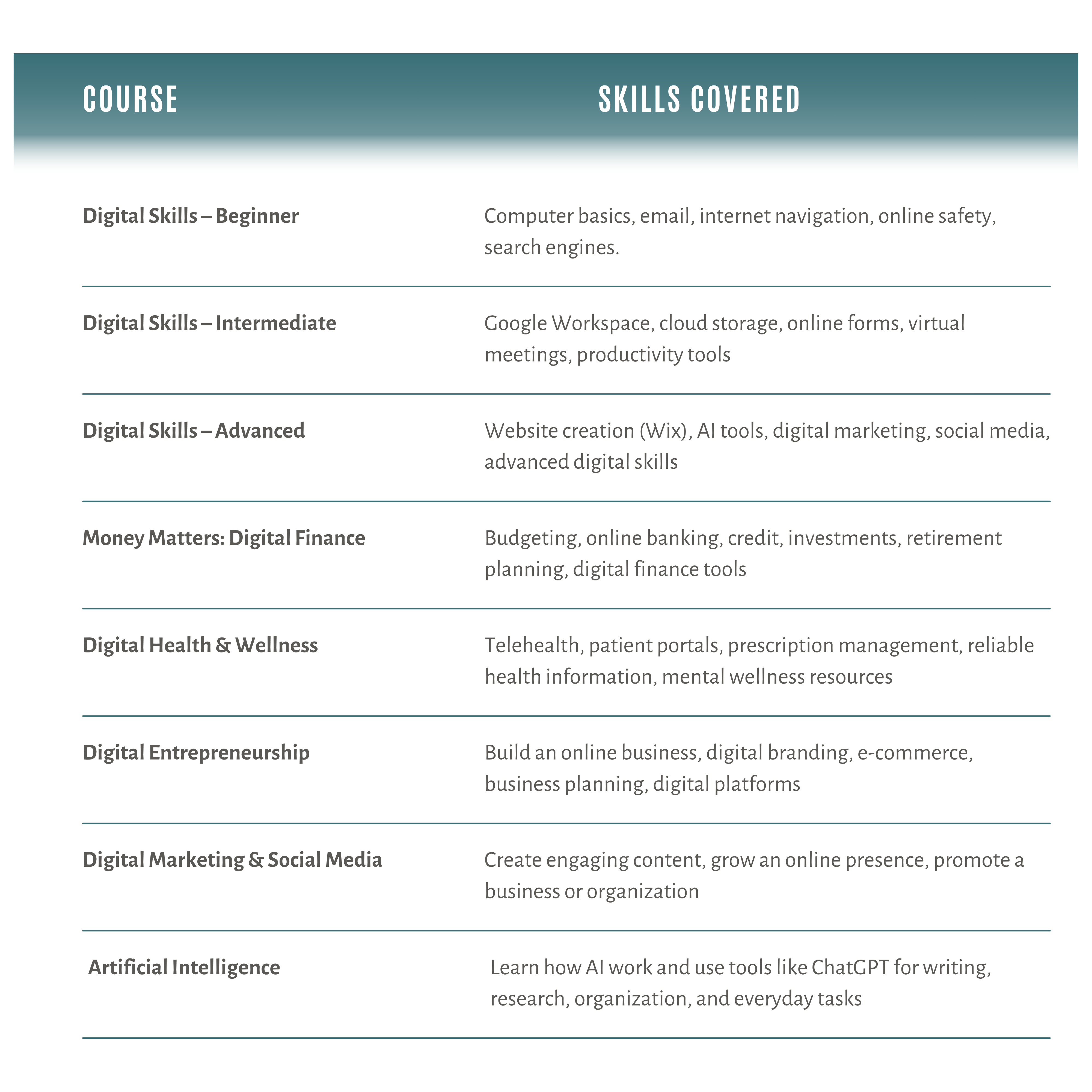
Participants can enroll in courses based on their interests, experience level, and personal goals. Whether someone is learning to use a computer for the first time or exploring emerging technologies like artificial intelligence, there is a course designed to meet them where they are.
Participants Leave With Skills They Can Use Every Day
- Find employment
- Apply for jobs online
- Build a resume
- Access healthcare
- Use online banking safely
- Connect with schools
- Access government services
- Stay connected with family
- Learn AI and emerging technology
- Start or grow a business
HOW YOU CAN HELP
Sharing This Program Is Easy
Community organizations like yours are among the most trusted sources of information for local residents. A recommendation from your staff, a flyer in your lobby, or mention in your newsletter can introduce someone to a resource they may never have found on their own.
You don’t need to be a technology expert to help close the digital divide. MBEP manages registration, instruction, reminders, and participant support. We simply ask for your help sharing this free opportunity with the residents you already serve.
Display a Flyer
Place a flyer in your lobby, waiting room, classroom, community board, or other public space where residents will see it.
Share with Your Network
Include the flyer or registration link in your newsletter, email updates, website, or social media. A quick mention helps reach residents who may not otherwise hear about the program.
Mention it in Conversation
If someone mentions they’re struggling with technology, looking for work, supporting a child in school, or trying to access online services, let them know these free classes are available.
Encourage Interested Residents to Sign Up
Encourage residents to complete the virtual Interest Form (for upcoming in-person classes) or register directly for ongoing virtual classes..